I've been using hugo-theme-terminal for my blog and really liked its clean, terminal-inspired aesthetic. But as someone who spends most of their day in Emacs, I wanted something that felt more like home.
So I vibe coded an Emacs-style theme with Claude. The entire thing - HTML templates, CSS, JavaScript interactions - was built through conversation with AI.
Features
Dired-style article list with reading time, word count, and dates
Window splitting with C-x 2 (vertical) and C-x 3 (horizontal)
Navigate with n/p, open with RET, go back with q
Modus Vivendi (dark) and Modus Operandi (light) themes, toggle with t
Emacs modeline showing buffer name, scroll position, and mode
TRAMP is one of Emacs' killer features. The ability to transparently edit files on remote machines, run shells, and use version control as if everything were local is remarkable. The implementation is impressively portable - it works over SSH, sudo, docker, and countless other methods by cleverly parsing shell command output.
I've been experimenting with an alternative approach that trades some of TRAMP's universality for speed improvements in the common SSH use case. This is very much an alpha project and nowhere near as battle-tested as TRAMP, but the early results are promising enough that I wanted to share it and get feedback.
How traditional TRAMP works
TRAMP's design is elegant in its simplicity: it pipes shell commands over the connection and parses their text output. This works on virtually any Unix-like system without installing anything on the remote host. Need to check if a file exists? Run test -e /path/to/file. Need file attributes? Parse the output of ls -la.
This approach has served the Emacs community well for decades. The trade-off is that each operation involves multiple round-trips and text parsing, which can add latency on high-latency connections or when performing many operations in sequence.
The tramp-rpc experiment
The idea behind tramp-rpc is to run a small server on the remote machine that speaks JSON-RPC instead of parsing shell output. This gives structured responses and enables request batching.
Usage is straightforward - use the rpc method instead of ssh:
/rpc:user@host:/path/to/file
The obvious downside is that you need to deploy a binary to the remote host. The tramp-rpc-deploy system tries to make this painless by automatically detecting the remote architecture and transferring a pre-built binary, but it's still an extra dependency compared to TRAMP's zero-install approach.
Why Rust?
The server needs to be a single static binary that works across different Linux and macOS systems. Rust makes this straightforward:
Static binaries with no runtime dependencies
Cross-compilation to x86_64 and aarch64
Async I/O with Tokio for handling concurrent requests
The type system helps catch protocol mismatches early
The resulting binary is around 2MB.
Some early benchmarks
On my setup (testing against a local NixOS machine), I'm seeing improvements like:
Operation
TRAMP-RPC
Traditional SSH
Speedup
file-exists-p
4.1 ms
56.1 ms
~14x
write-region
4.1 ms
231.9 ms
~57x
directory-files
4.1 ms
43.1 ms
~11x
copy-file
21.9 ms
189.7 ms
~9x
These numbers will vary depending on your network latency and system configuration. I'd be curious to hear what others see on their setups.
Batch operations
One area where the RPC approach helps is batching. When listing a directory, Emacs often needs to stat many files. With tramp-rpc, these can be bundled into a single request:
This reduces the number of round-trips for operations that touch many files.
PTY support
Terminal emulators like vterm and eat need proper pseudo-terminal support. The server implements PTY management using Unix openpty, which means remote terminal sessions should work correctly:
Then use /rpc:user@host:/path instead of /ssh:user@host:/path.
Looking for feedback and contributions
If you try this out, I'd love to hear about your experience:
Does it work on your setup? What issues did you hit?
Are there operations that are particularly slow or broken?
What features would make this more useful for your workflow?
Ideas for improving the deployment experience?
Contributions are very welcome, whether that's bug reports, documentation improvements, or code. The project is at an early stage where input from different use cases would be especially valuable.
Living inside Emacs is a dream - email, git, project management, writing, coding all in one environment. But every so often, something forces you back to a web browser. Uploading receipts to my accountant through ClearFacts was one of those moments.
Every month, receipts and invoices accumulate that need to reach my accountant. ClearFacts provides an API for this, but the journey from documentation to working solution proved more interesting than expected.
The documentation puzzle
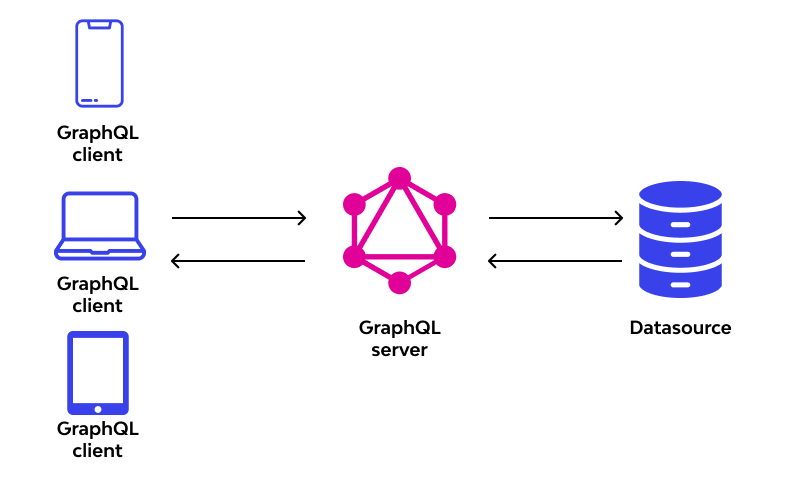
ClearFacts' developer documentation presents itself as a REST API with nice-looking endpoints. Click through to actually use one, and you discover it's GraphQL underneath. The REST endpoints don't work - everything goes through a single GraphQL endpoint.
Fair enough, GraphQL is fine. Except the endpoint doesn't support introspection. For those unfamiliar, GraphQL servers typically expose their schema through introspection, letting tools automatically understand available queries and mutations. ClearFacts disables this.
The schema does exist in the documentation, but scattered across multiple pages. Each type, query, and mutation lives on its own page with its own navigation. Manually piecing this together would be tedious and error-prone.
Reconstructing the schema
An AI agent solved this efficiently. By feeding it the documentation pages, it reconstructed a complete, unified schema. Not something I'd want to do manually, but entirely straightforward for an LLM that can process multiple pages and understand GraphQL schema syntax.
The result: a single schema.graphql file containing all types, enums, queries, and mutations in proper GraphQL schema definition language.
The Emacs GraphQL client gap
Emacs has graphql-mode, which handles GraphQL queries well. It can send queries, display results, and integrate with endpoints defined in .graphqlconfig files. However, it lacked support for file uploads - a requirement for sending PDFs to ClearFacts.
The mode also expected a different format for multipart form data than what ClearFacts required. Pull request #69 addressed both issues, adding:
Support for graphql-upload-files to specify files for upload
A graphql-upload-format variable to choose between different multipart formats
Proper handling of the form-data format that ClearFacts expects
Setting up the configuration
With the patched graphql-mode, the setup became straightforward. A .graphqlconfig file defines the endpoint and authentication:
Before automating everything, the basic workflow in graphql-mode works like this: open upload_file.graphql, position the cursor inside the mutation, and execute C-u C-c C-c. This prompts for a file to upload, then sends the mutation with the configured variables from upload_file_vars.json.
The C-u prefix argument tells graphql-mode to handle file uploads. Without it, C-c C-c just sends a regular query. With the prefix, it reads the graphql-upload-files variable and includes the files in the multipart form data request.
This works, but requires manually updating the fileName variable in upload_file_vars.json to match the actual file being uploaded. The filename appears in two places: as the file being uploaded and as a GraphQL variable. Keeping them in sync manually gets tedious.
Literate automation with Org mode
The literate Org mode solution (commands.org) automates the synchronization. An Elisp source block prompts for the file, updates the GraphQL variables with the filename, and sends the mutation:
(let*((file-path(read-file-name"Select file to upload: "))(file-name(file-name-nondirectoryfile-path))(vars-file"upload_file_vars.json")(vars(json-read-filevars-file)));; Update fileName in variables(setf(alist-get'fileNamevars)file-name)(with-temp-filevars-file(insert(json-encodevars)));; Upload the file(with-current-buffer(find-file-noselect"upload_file.graphql");; Load endpoint from .graphqlconfig(let((config(json-read-file".graphqlconfig")))(let-alistconfig(if-let((endpoint(cdr(assq'default.extensions.endpoints))))(let-alistendpoint(setq-localgraphql-url.url)(setq-localgraphql-extra-headers.headers)))));; Configure file upload(setq-localgraphql-upload-format'form-data)(setq-localgraphql-variables-filevars-file)(setq-localgraphql-upload-files`(("file".,file-path)))(graphql-send-query))(message"Uploading file: %s"file-name))
Execute the block with C-c C-c, select a file, and it uploads. The literate programming approach keeps the logic clear and modifiable - no hidden automation, just explicit steps in an executable document.
The payoff
What started as "I need to send receipts to my accountant" became a small exercise in API archaeology, tool patching, and Emacs integration. The result is faster than logging into a web interface and more reliable than remembering to batch uploads.
One less reason to leave Emacs. The dream of living entirely within one environment gets a little closer with each workflow automated away from web interfaces.
Ellama is a tool for interacting with large language models from Emacs. It allows you to ask questions and receive responses from the LLMs. Ellama can perform various tasks such as translation, code review, summarization, enhancing grammar/spelling or wording and more through the Emacs interface. Ellama natively supports streaming output, making it effortless to use with your preferred text editor.
The name “ellama” is derived from “Emacs Large LAnguage Model Assistant”. Previous sentence was written by Ellama itself.
Ellama offers a frontend to LLMs for diverse purposes.
In a buffer it can correct grammar mistakes, enhancing wording (quite useful for a non native english speaker!), answer general question, assist in writing or editing code and more.
Ellama can also be fed the current buffer or specific files when asking questions.
Overall, I like Ellama a lot, relying on it approximately 90% of the time for my LLM needs at the time of writing.
One thing I particularly like about Ellama is that switching out models is particularly easy, which makes LLM experimentation fun.
One aspect I like a bit less about Ellama is in replicating a conversational, 'chat', experience, an area where gptel is better. A conversations continuum requires re-invoking the ellama-chat interface.
ellama-chat takes input from the echo area, which is not super edit friendly.
Initially, Ellama's support was limited to locally hosted models via the Ollama API. However, with its transition to utilizing the LLM Emacs package, it now also supports OpenAI-compatible APIs, a standard nearly universally adopted across providers.
Ellama with doom emacs
By default Ellama saved its sessions into my .doom.d/ folder. Doom emacs uses a variant of org mode for documentation in there which made emacs hang when Ellama was used.
The solution is to place configure ellama-sessions-directory some place else like
gptel is a simple Large Language Model chat client for Emacs, with support for multiple models and backends. It works in the spirit of Emacs, available at any time and uniformly in any buffer.
Unlike Ellama which leverages the llm emacs package behind the screen, gptel has its own backend code for talking to multiple llm providers.
gptel's functionality is more limited compared to Ellama or at least a bit more 'manual'. It's just provides a chat interface to llms. However it does feel more like a real chat than Ellama.
gptel does feature a menu to change the instructions, context, providers, input and output parameters of the requests.
It works well, but I feel that this menu to do things integrates less well into my workflow.
I also like changing llm providers often and out of the box gptel's menu makes that a few more steps.
Adding all Openrouter and Ollama models to gptel and Ellama
As already mentioned, I like playing with multiple LLMs. Openrouter provides access to a lot of different models.
I want to have access to all off them in emacs.
Neither gptel, nor Ellama can access all off them by default, so I had Ellama write me some code to achieve his.
Ellama with openrouter models
First we need to get a list of the models names and id from openrouter.
Openrouter has an api for that via https://openrouter.ai/api/v1/models
This is the elisp code to get those in a pair of name and id
Now the same can be achieved for gptel.
gptel does know the concept of adding more models from the same provider in one place as a list at the :models parameter.
(gptel-make-openai"OpenRouter";Any name you want:host"openrouter.ai":endpoint"/api/v1/chat/completions":streamt:key(gptel-api-key-from-auth-source"openrouter.ai"):models(mapcar(lambda(model)(cdrmodel))(fetch-openrouter-models)))
BONUS: gptel with all Ollama models
Ellama can already get all the Ollama models currently installed, but gptel needs an explicit list.
(defunget-ollama-models()"Fetch the list of installed Ollama models."(let*((output(shell-command-to-string"ollama list"))(lines(split-stringoutput"\n"t))models)(dolist(line(cdrlines)); Skip the first line(when(string-match"^\\([^[:space:]]+\\)"line)(push(match-string1line)models)))(nreversemodels)))(gptel-make-ollama"Ollama";Any name of your choosing:host"localhost:11434";Where it's running:streamt;Stream responses:models(get-ollama-models));List of models
M-x:
Keyboard Shortcuts
Navigation (List)
n / ↓Next article
p / ↑Previous article
RET / oOpen article
qGo back to list
<Beginning of list
>End of list
Windows
C-x 3Split horizontal (side by side)
C-x 2Split vertical (stacked)
C-x 0Close current window
C-x 1Close other windows
C-x o / TabSwitch to other window
C-x bSwitch to list buffer
Scrolling (Content)
n / pScroll down/up (split) or next/prev article (single)